HTML Table
HTML Table
HTML Table
HTML table is used to define tables on a web page, which shows the data in tabular form.
| Name | Email Id | Phone No | Age |
|---|---|---|---|
| Aditi Musunur | abd.happel@autozone-inc.info | (392) 181-8544 | 34 |
| Advitiya Sujeet | garne-endres@progressenergyinc.info | (375) 585-3565 | 23 |
| Alagesan Poduri | ly_cha@progressenergyinc.info | (683) 734-4276 | 45 |
| Amrish Ilyas | yeva.brye@progressenergyinc.info | (791) 729-0692 | 28 |
| Aprativirya Seshan | shgd@gmail.com | (375) 585-3565 | 13 |
| Asvathama Ponnada | maria@gmail.com | (524) 386-5730 | 32 |
| Debasis Sundhararajan | ander@mail.com | (268) 508-9243 | 35 |
| Gopa Trilochana | starstuff@live.com | (950) 926-1612 | 24 |
| Jitendra Choudhary | chance@outlook.com | (950) 926-1612 | 40 |
| Naveen Tikaram | jrkorson@yahoo.ca | (272) 211-7370 | 44 |
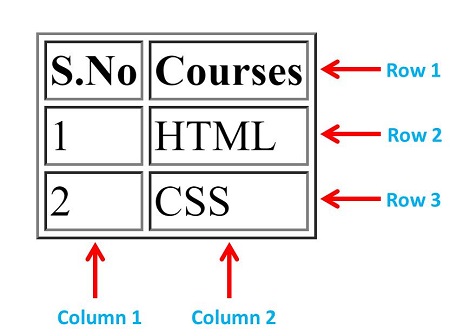
The table is divided into Rows and Columns.
-
Rows are horizontally aligned which contains one or more columns.
-
Columns are vertically aligned which contains one or more rows.
-
All the rows and columns come inside <table> tag.
-
A row is define by <tr> tag.
-
Column contains table data which are define by <th> tag and <td> tag.
-
<th> tag is used to define table heading. It makes the text bold which increase the importance of text.
-
<td> tag is used to define normal table data.
Example:
<table>
<tr>
<th>S.No</th>
<th>Courses</th>
</tr>
<tr>
<td>1</td>
<td>HTML</td>
</tr>
<tr>
<td>2</td>
<td>CSS</td>
</tr>
</table>
HTML Border Attribute
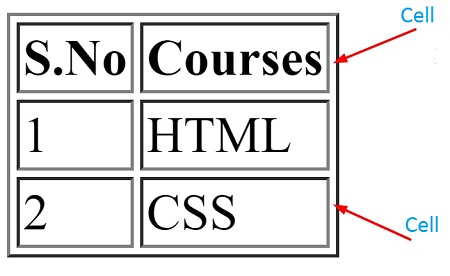
HTML border attribute is used to give a border to a table.
-
HTML Border Attribute is defined by border="value" syntax.
-
Value can be 0,1,2,3 and more.
-
0 is by default which shows no border.
-
1,2,3 and more adds the border around the cell (A cell is a block which contains single data in the table).
Example:
<table border="1">
<tr>
<th>S.No</th>
<th>Courses</th>
</tr>
<tr>
<td>1</td>
<td>HTML</td>
</tr>
<tr>
<td>2</td>
<td>CSS</td>
</tr>
</table>
HTML Colspan Attribute
To extend the one column into several columns we used colspan attribute.
Example:
<tr>
<th colspan="2">Phone No.</th>
</tr>
<tr>
<td>+91 1234567898</td>
<td>+91 1234567897</td>
</tr>
<tr>
<td>+91 1234567896</td>
<td>+91 1234567894</td>
</tr>
</table>
HTML Rowspan Attribute
To extend the one row into several rows we used rowspan attribute.
Example:
<tr>
<th rowspan="3">Telephone</th>
<td>+91 1234567898</td>
</tr>
<tr>
<td>+91 1234567896</td>
</tr>
<tr>
<td>+91 1234567894</td>
</tr>
</table>
HTML Table Caption
To add a caption (summary of table) to a table, use the <caption> tag.
-
The <caption> tag must be inserted immediately after the <table> tag.
Example:
<table border="1">
<caption>Student Marksheet</caption>
<tr>
<th>S.No</th>
<th>First Name</th>
<th>Subject</th>
<th>Marks</th>
</tr>
<tr>
<td>1</td>
<td>Ram</td>
<td>Math</td>
<td>89</td>
</tr>
<tr>
<td>2</td>
<td>Krishna</td>
<td>Physics</td>
<td>78</td>
</tr>
<tr>
<td>3</td>
<td>Mohan</td>
<td>Chemistry</td>
<td>56</td>
</tr>
</table>